When I first stepped into leadership, it wasn’t because I wanted authority or a title. It was because I realized something simple but powerful:
I was good at what I did – but I was only one person.
If I could coach, mentor, and elevate others to think and operate the same way, my impact would multiply far beyond what I could accomplish alone.
That realization changed everything for me.
The Trap of the “Hero Leader”
Too often, I see leaders step in to solve every tough challenge their team faces. They’re the go-to problem-solvers: smart, reliable, efficient. But here’s the truth: that’s not leadership. That’s being an individual contributor with a title.
When a leader becomes the bottleneck for solutions, they’re not leading, they’re limiting. They might keep the team afloat in the short term, but they rob people of the growth that comes from wrestling with hard problems, making mistakes, and finding their own way forward.
Real leadership means letting go. It’s about resisting the urge to jump in and fix things, even when you know exactly how to do it faster or better. It’s about trading immediate control for long-term capability.
From Solving Problems to Building Problem Solvers
Leadership isn’t about making sure all the problems get solved. It’s about making sure your team learns how to solve them.
Will they make mistakes? Absolutely.
Will it be painful at times? Of course.
But imagine this: a few months from now, you have a team full of people who can solve complex issues, make confident decisions, and lead others, without you needing to step in.
That’s when you stop being a manager of tasks and become a builder of capability.
That’s when you move from success to lasting significance.
Multiplying Your Impact
The greatest leaders don’t succeed because they do more. They succeed because they create more people who can do.
If you spend your time mentoring and developing others to think critically, take ownership, and stay calm under pressure, your influence compounds. You’re no longer responsible for a single output, you’re responsible for an ecosystem of performance.
That’s real leadership.
Your Success Is Measured Through Others
As a leader, your success is no longer about what you deliver. It’s about what your team delivers, consistently, sustainably, and independently.
Success doesn’t come from doing. It comes from teaching, guiding, and trusting.
If your team succeeds when you’re not in the room, that’s the true test of leadership.
Final Thought:
A great leader doesn’t say, “I solved the problem.”
A great leader says, “My team solved it — and they didn’t even need me this time.”
Mature technology teams don’t just automate, they architect their automation through standards, structure, and feedback loops.
The result is a repeatable system where everything from design to deployment is governed, auditable, and scalable.
Build Your Standards Top-Down, Not Bottom-Up
Before we get started, it’s important to address a critical concept. Too many organizations rush to publish “standards” for everything under the sun, without structure, hierarchy, or clarity. The result is chaos disguised as governance.
Instead, I recommend a top-down approach to designing your standards and automation framework. One that scales with intent, not noise.
There are five core layers (L0–L4), plus two higher layers (Programs and Patterns) that define what you deliver and how you deliver it.
When drafting standards or creating automation, always start at the top:
Program (Why): Define what capability or service your team provides.
Pattern (What): Describe the approved ways that capability can be delivered.
L0 (Building Blocks): Modular “Lego pieces” that can be reused across multiple patterns.
L1 (Governance SOPs): High-level, auditable operating procedures. These explain what must be done and why, not how.
L2 (Standards): Define the exact configuration values or thresholds that must be applied consistently.
L3 (Runbooks): Step-by-step technical procedures that bring the L1/L2 requirements to life.
L4 (Automation): Convert the L3 runbooks into automated pipelines, validations, and feedback loops.
Mature organizations work this way, top-down, not bottom-up.
They begin with the Program (the “why”), define the Patterns (the “what”), and then build the how underneath.
This approach ensures every standard, SOP, and automation has a purpose. You’re not just automating tasks, you’re automating intent, aligned with strategy and governance.
You can’t automate excellence until you’ve defined what excellence looks like.
Programs
At the top level sits the Program, a unifying layer of governance that defines the capability itself.
A Program represents something your team is committed to delivering or required to offer to the organization.
Goal: Deliver consistent, compliant SQL Server environments across the enterprise — on-prem, in the cloud, or hybrid.
Examples:
SQL Server Deployment Program
SQL Server Patching & Lifecycle Program
SQL Server Monitoring & Alerting Program
Each Program contains multiple Patterns, each solving a distinct architectural use case.
Patterns
Patterns represent approved, reusable architectural blueprints for specific use cases.
They define what configurations your organization officially supports, and when to use each one.
Examples:
SQL Server Standalone Instance
SQL Server Always On Availability Group (AOAG)
SQL Server Failover Cluster Instance (FCI)
SQL Server Managed Instance (Azure)
Each Pattern draws from a library of Block Kits, which define the underlying technical building blocks.
L0 – Block Kits: The Reusable Building Blocks
L0 is the foundation, your Block Kits.
Think of them as Lego pieces that can be combined to form any approved SQL Server Pattern.
Each Block Kit is a modular, standardized component representing a key part of the platform lifecycle.
Examples:
SQL Engine Installation
Service Account Configuration
Database File Layout
Backup & Restore Configuration
Monitoring Agent Setup
Each Block Kit is supported by:
L1 SOPs – governance-level guidance
L2 Standards – configuration and compliance rules
L3 Runbooks – tactical, step-by-step instructions
Goal: Establish reusable, standardized components that support multiple patterns. Write once, reference often.
L3 takes the requirements from L1 and the rules from L2, and turns them into tactical, actionable steps.
These are your “open this console → run this script → validate this output” guides.
Examples:
Step-by-step SQL install using approved service accounts
PowerShell or T-SQL commands to create AOAG listeners
Verification steps for SQL Agent job replication
Post-deployment validation scripts for CIS compliance
Goal: Provide detailed, repeatable execution steps for engineers or automation pipelines.
L4 – Automation & Optimization
At L4, your organization fully integrates all prior levels into automated pipelines and feedback systems.
This is where deployment, validation, and optimization happen continuously — closing the loop from governance to execution.
Examples:
Azure DevOps pipeline executes SQL deployment via L3 logic
Automated validation jobs cross-check against L2 standards
Audit reports auto-populate based on L1 compliance data
Metrics feed back into the Program for continuous improvement
Goal: Achieve self-enforcing, data-driven automation tied directly to your governance framework.
The Hierarchy in Action (Example: SQL Server AOAG Pattern)
Level
Artifact Type
Purpose
Example
Program
Governance
Define capability & scope
SQL Server Deployment Program
Pattern
Architecture
Blueprint for use case
SQL Server AOAG Deployment Pattern
L0
Block Kits
Modular building blocks
Service Accounts, Backup Config, Engine Install
L1
SOP
Audit-level guidance
Ensure domain accounts
L2
Standards
Technical guardrails
MaxDOP, TempDB config, encryption
L3
Runbook
Tactical execution
Install, configure, verify AOAG
L4
Automation
System enforcement
Azure DevOps pipeline validates and deploys
Final Thoughts
Each layer serves a purpose:
L1 keeps auditors and leadership confident.
L2 keeps engineers aligned.
L3 keeps operations consistent.
L4 keeps automation intelligent.
L0 ties it all together through reusable components.
When your standards flow this way, from Program to Pattern, from governance to automation you don’t just deploy Patterns, you deploy trust, repeatability, and velocity.
Navigating the landscape of a DBA job search can certainly pose its challenges. However, what often amplifies the difficulty is the absence of a standout resume. Over my career as both a DBA and a DBA manager, I’ve overseen the hiring of numerous DBAs, sifting through a multitude of resumes, each seemingly a duplicate of the last.
Typically, they begin with an entire page summarizing themselves and listing their top skills. Often, this is a laundry list of SQL Server skill the candidate has had experience with or even heard of. This is then repeated throughout their job history section, as well, under every job. This approach invariably yields lengthy resumes spanning 6-7 pages, lacking the crucial narrative that sets one candidate apart from the rest. If there are details to set them apart, they are often hard to find. A few examples of the skills I most often see listed are..
Performed database backups
Performed integrity checks
Configured Availability Groups
Configured Log Shipping
Tuned SQL Queries
Installed SQL Server
Configured SQL Server
Managed SQL Logins
Configured SQL Agent jobs
etc….
News flash – if you have more than a few years of experience as a DBA, I already expect you to have experience with most, if not all, all these skills. Consequently, during interviews, I will be sure to delve into these competencies.
What I truly appreciate is when a candidate provides a very short summary about why they are the best DBA I’m likely to meet throughout this process, and then share 6-12 high skills that make them great employee. Notice I used “great employee” in that last sentence, not “great DBA”. First and foremost, you must demonstrate yourself as a great employee. More specifically, someone that tis able think beyond the single DBA task in front of them, and what the broader impact is to the business. Being a great DBA is secondary to any job you will ever hold. You cannot be a great DBA if you’re continuously working towards objectives and goals that are not aligned with the business. That is not to say there will not be times where you need to be able to sell the business on why you believe a particular goal or objective is the right path forward for the organization.
Below are a few goods skills to considering showcasing in your resume. However, to be prepared to talk about any skills you list. If you say you’re great at “Incident Avoidance” or “Automation”, You’re going to be asked for details. If you can’t provide them, that’s typically a red flag to the interviewer.
Business Acumen
Application Availability
Critical Thinking
Detail Oriented
Root Cause Analysis
Incident Avoidance
Mean Time to Recovery
Punctual
Security Best Practices
Time Management
Collaboration
ITIL
Automation
Active Listener
Subsequently, when articulating your professional experience, emphasize the transformative impact you’ve had on your teams and organizations. Highlight instances where you spearheaded initiatives or achieved feats that set you apart from the average DBA. Try to tie these back to your top skills.
Lastly, keep your resume short. As a manager, my calendar is often filled with meetings, there are constant fires to address with other individuals or teams, and numerous other things pulling on my attention. During a typical day, I may only find a 30 minute window to review a backlog of resumes. I need to be able to review them quickly and easily be able identify a select few that should be considered for a first round interview. Make yours standout as quickly as possible. Ideally within 30 seconds I’m making up my mind as to whether I will move an application forward to the next round or reject it.
Note: this post covers backup behaviors prior to SQL Server 2025…
With Availability Groups, there’s long been a common theme in the database community:
“Offload your backups to a secondary replica — it saves load on the primary.”
It sounds great in theory. And I know people who’ve done it successfully… and others who thought they were doing it. But the real question is — should you?
Backup Types available on Secondary Replicas
Let’s start with what’s actually possible.
On secondary replicas, you can perform:
COPY_ONLY full backups, and
Regular transaction log backups (non–copy-only).
You cannot take:
Differential backups
Full backups
Or, concurrent backups of the same database across replicas.
That last point surprises many DBAs.
If a full backup is running on one replica, you can’t take a log backup of that same database on another replica at the same time.
That’s because secondaries are read-only, and the backup process can’t update the msdb backup history tables or the database’s backup LSN metadata.
For organizations relying on differential backups, this can be a deal-breaker — because diffs must be taken on the primary replica (where write access exists).
Controlling where you backups run
When you configure Availability Groups, the wizard lets you choose where backups should run.
Sounds great, right? Unfortunately, this setting is often misunderstood.
The truth:
That setting does nothing automatically, unless your backup jobs explicitly use it.
To honor the backup preference, your job must call the function:
Many DBAs assume checking the box in the AG Wizard was enough, only to later discover all backups still ran on the primary because their custom jobs ignored this function.
Even some third-party backup tools don’t fully honor the preference setting. So, if you’re using anything outside SQL Maintenance Plans, verify your jobs are replica-aware.
Log backups and Secondary Replicas
Another often-overlooked point:
Regardless of which replica takes the log backup, it becomes part of the same log chain across all replicas.
That’s both a blessing and a curse.
The good news:
If you take log backups on a secondary, the primary knows about them and can truncate its transaction log accordingly.
The risk:
Lose any of those log backups, and you’ve broken your chain.
I once saw a 3rd-party backup tool that ran “differential” jobs on a secondary replica.
Because diffs aren’t possible there, the tool quietly substituted log backups instead — adding unexpected log backups to the chain.
When a restore was later needed, that single “extra” log file became critical to recovery. But, no one knew it existed.
Always trace your backup history across replicas before assuming your chain is intact.
Integrity Checks
You might ask — “What do integrity checks have to do with backup locations?”
A lot, actually.
If you’re running DBCC CHECKDB on your primary but taking backups from your secondary, you’re assuming both databases are identical and uncorrupted.
That’s not guaranteed.
Imagine this:
You run checks only on the primary for months.
Meanwhile, the secondary develops undetected corruption.
Then one day, a table is accidentally dropped on the primary.
Because the database is in an AG, the table vanishes everywhere — and your only restore point is a corrupted backup from the secondary.
The lesson:
If you run backups from a replica, make sure you also run CHECKDB on that replica. In fact, you really should be running integrity checks on all replicas, regardless. None-the-less, be aware of this dependency when deciding where your backups live.
Backup Preference Options
Assuming you’ve built replica-aware backup jobs that call the system function, which preference should you choose?
You have four options:
Prefer Secondary — use secondaries if available, else fall back to primary
Secondary Only — use secondaries exclusively (dangerous)
Primary — always use the primary
Any Replica — allow any
“Secondary Only” is the riskiest. If all secondaries are offline, no backups will run.
At minimum, use Prefer Secondary, which provides fallback protection.
Remember: this setting applies per Availability Group, not per database, something that occasionally surprises teams with multi-database groups.
So, should you take backups on your secondary replicas?
In my opinion: No — not for your primary, business-critical backups.
Here’s why:
Backups on secondaries come with conditions:
The replica must be connected to the primary.
The database must be in SYNCHRONIZED or SYNCHRONIZING state. If either is false, the backup fails.
Add replication latency into the mix, and you must also add that delay to your RPO.
If your AG is 5 minutes behind and you restore a “15-minute-old” backup, you’re really restoring data from 20 minutes ago.
And yes, synchronization lag can still happen even in synchronous commit mode.
Network congestion, storage latency, or maintenance activity can delay redo.
Now imagine your weekly full backups run overnight, at the same time you patch and reboot the secondary.
Your backups fail quietly.
You keep only two weeks on disk.
When disaster hits, your last valid backup is gone.
That’s a career-defining problem.
If you like what you’ve read, please subscribe so you don’t miss my latest posts…
I started my blog to push the boundaries of what I believe to be true. I’ve been very successful throughout my career as a DBA. Regardless of the role, the work always seemed to “click”. Problems came up, and I handled them. New challenges appeared, and I figured them out too. Being the go-to DBA wherever I worked became part of my identity.
But in late 2021, I realized something important: my knowledge was not being stretched anymore. The traditional ways I used to grow no longer challenged me. If I wanted to keep getting better, I needed to put myself in uncomfortable places. I needed to share my thoughts publicly and invite people who were smarter, more experienced, or simply had a different perspective to push back and make me sharper.
And that’s where imposter syndrome enters the picture. Stepping out from behind the mask means facing the possibility that maybe I’m not as good as I thought I was. That once I’m visible, the “real” DBAs with decades of experience might expose gaps I didn’t even know I had. But that’s the point. Growth requires the willingness to be wrong, to listen, and to learn.
So I’ve set three commitments for myself:
Read three blog posts a day.
Write at least one blog post per week.
Engage consistently in the data community and on social platforms.
I don’t know where that path will take me by the end of 2022. But I knew one thing: it’s time to take off the mask and find out.
My challenge to you is the same. Step outside your comfort zone. Choose something, anything, that forces you to stretch, grow, and level up in areas you care about. If we all stay where we’re comfortable, we guaranteed to stay average.
And lastly, if you ever see me post something inaccurate, call it out. Let’s fix it together. I genuinely welcome that. It’s why this blog exists in the first place.
To be honest, this isn’t something I ever thought I needed to know, until one day, I found a database where transactions were failing with the error:
“PRIMARY filegroup is full.”
Naturally, I did what any DBA would do and checked whether auto-growth was enabled. It was.
So why wasn’t the file growing?
The answer wasn’t immediately clear, but I had a suspicion.
Understanding the Limit
Let’s do the math: 2,147,483,647 pages × 8 KB = 17,179,869,176 KB ≈ 16 TB
To be precise, it’s 16 TB minus 128 KB, but practically speaking, that’s your ceiling. Once a data file reaches that size, it cannot grow further, even if auto-growth is enabled.
What Happens at the Limit
When a file hits the 16TB boundary, SQL Server stops allocating new space and you’ll start seeing errors like:
Msg 1101, Level 17, State 12, Line 1
Could not allocate a new page for database ‘YourDB’ because of insufficient disk space in filegroup ‘PRIMARY’.
Auto-growth won’t help you here, it simply fails silently because the file can’t grow beyond the INT limit.
This issue applies per data file, not per database. That means your database can grow beyond 16TB overall, but only if you add additional data files to the same filegroup.
The Real-World Example
Any guesses how big my data file was?
You got it — 16TB.
That’s a lot of space, and hopefully you never have to manage a single file that large. But if you do, be aware that once it hits this limit, new writes will fail, even if auto-growth is configured properly.
The fix is simple: Add another data file before you reach the limit.
It’s been a a several weeks since Microsoft started releasing details on SQL Server 2022. Here are two of the new features I’m most interested in.
Parameter Sensitive Plan Optimization
Parameter Sniffing has been plaguing SQL Server for years, and it sounds like Microsoft is finally putting some real effort into fixing the problem. Traditionally, when a query is executed, SQL Server will build and cache one plan. It does this based on the first set of parameters used during the initial execution. All subsequent executions of the same query, regardless of the parameters, will use the exact same execution plan. This is not always ideal, as one set of parameters may perform better with an index seek, while another may perform better with an index scan. Starting in SQL Server 2022, Microsoft is planning to solve this problem with Parameter Sensitive Plan Optimization. From what they’ve demonstrated, this would work by having SQL Server cash multiple plans for the same query, and decide which one would be more appropriate for a given set of parameters. There are not many details available yet, and several questions are yet to be answered, such as how many plans might get cached per query. But in general, I’m still excited to see how this performs in the real world.
Bi-directional Failover between SQL Server 2022 and Azure SQL Managed Instance
This is another intriguing feature. For years, I’ve been cautious about moving too aggressively into Azure SQL. Aside from operational cost over time, my reasoning was largely related to the fact that once you had your data there, it was much more difficult to get it back out. This is because Azure SQL is always running the newest release of SQL Server, and downgrading to an on-premise SQL Server version was not fully supported. There were ways around it, but this may be the most streamlined way, thus far. This will also be a great news for those looking to run a SQL Server on-premise, but are not able to manage a full DR region. With SQL Server 2022, you’ll now be able to add an Azure SQL Managed Instance as a failover target. Once you enable this, Microsoft will setup up a Distributed Availability Group behind the scenes between your on-premise instance and your Azure SQL Managed Instance. After setup is complete, you’ll then be able to freely fail back and forth between Azure and on-premise.
What about you, what feature are you most looking forward to in SQL Server 2022?
If you like what you’ve read, please subscribe so you don’t miss my latest posts…
You’ve just taken a new job — congratulations! Now you’re responsible for 50+ SQL Server instances, maybe more. So what’s your 30, 60, or 90-day plan look like?
Check backups?
Verify integrity checks?
Implement maintenance plans?
All great ideas. But none of those should come first.
Step One: Know What You Actually Manage
Many of us have been there…
You think you’re monitoring your entire SQL estate.
You think backups are configured.
Then an application goes offline — one you’ve never heard of. After some digging (and maybe a panicked dev call), you finally track down the SQL instance… and discover backups haven’t run in months.
As DBAs, “I didn’t know about that server” doesn’t fly. It’s our job to know where every SQL Server lives.
Step Two: Build an Accurate Inventory
Your first priority is simple: build an accurate database inventory.
Ideally, this should be automated and refreshed regularly. Because somewhere in your organization, someone will spin up a SQL instance for a “quick test”, and before long, it becomes your problem.
Before tuning a single query or updating a single backup schedule, make sure inventory is complete and trustworthy.
Step Three: Make It Routine
Inventory isn’t a one-time task. It’s easy to get distracted by shiny objects or urgent tickets, but if you’re not disciplined, you’ll look up a year later and realize there are servers you never captured.
Once your inventory is solid, then you can tackle tech debt: backups, consistency checks, monitoring, patching. All while knowing your estate is accounted for.
Tools That Can Help
dbatools → Find-DbaInstance
Idera SQL Discovery
Microsoft MAP Toolkit
Final Thoughts
Inventory collection isn’t glamorous, but it’s foundational. You can’t manage what you don’t know exists.
What tools or scripts do you use to track your SQL Server inventory?
Drop a comment below — I’d love to hear how others approach it.
Something I see regularly is developers trying to write stored procedures to service multiple update scenarios. They typically accomplish this by adding multiple input parameters to the stored procedure and then using an OR operator in the update statement to match the parameter that a value was provided for. In many scenarios this works okay and no one ever notices the performance hit this type of stored procedure takes. That is, until the table being updated grows to millions of rows or there are joins involved. Suddenly that update that used to take less than one second it now taking 10-20 seconds.
For my examples, I’ll be using the AdventureWorks 2019 OLTP database. This can be downloaded from Microsoft for anyone interested trying this themselves. First, we’re going to give Janice a few extra hours of vacation time. Below is the statement we’ll use.
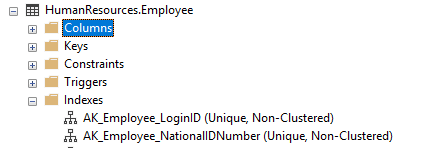
Now, before we execute that, let’s check what Indexes are on the table.
We can see there is a NONCLUSTERED index on LoginID, and another on NationalIDNumber. Now, how is SQL Server going to use these indexes when we attempt to update Janice’s vacation hours? After all, we’re providing a value for LoginID, right?
Wow, we actually did a CLUSTERED index scan instead of a NONCLUSTERED seek, and read 290 rows before we found the 1 row we were looking for. Again, not significant numbers based on the size the database we’re testing in. But these numbers can escalate quickly in a much larger database.
But why didn’t SQL Server using our NONCLUSTERED index? Consider this, we don’t have an index with a single key that covers both columns in our WHERE clause. Further, SQL Server has to assume that either one of them won’t be a match due to our use of the OR operator. So, best case scenario would be for SQL Server to do an Index Seek on both NONCLUSTERED indexes and join the results. However, that would be pretty costly, so SQL Server decided it would rather do a CLUSTERED index scan in this scenario.
Now, do we think the result will be an different if we pass in NationalIDNumber instead? let’s try.
No, we get the same execution plan. Now, the estimates are still good in this plan. SQL Server expected 1 row and found 1 row. SQL Server only had to read 290 before finding that 1 row.
Now, let’s add another layer of complexity that I’ve seen a few times. Developers think that by splitting the WHERE clause into two AND statements, each with its own OR operator embedded in the middle, that they can avoid this above issues. This code usually looks like this.
So, if we execute this statement, does SQL Server have a better understanding of which index it can use?
No, the plan actually gets worse. Now SQL Server is expecting to find 55 rows and only finding 1. This may not seem like a big deal, but SQL Server clears RAM for the expected result set, before it begins to execute the query. In this case, SQL Server is clearing space in RAM for the expected 55 rows, instead of just enough space for the one row it will actually find.
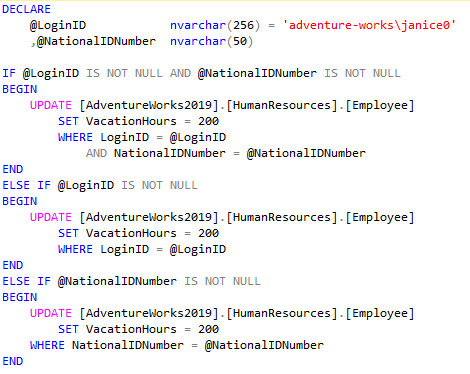
Now, let’s try this update a different way. We’re going to write an IF statement to separate out the possible combination of parameters that may be populated at execution time. Here is what that update statement would look like.
Now, how will this statement perform?
Wow, this actually produced the Index Seek we’ve been looking for. Better yet, SQL Server expected to read 1 row and actually read only 1 row. It doesn’t get much better than that. By writing our update statement this way, we’ve allowed SQL Server to build an execution for the exact parameters we populated. If we were to populate NationalIDNumber instead of LoginID, SQL Server would build a plan for that update statement separate from the one for LoginID. Now, I’ll avoid the topic for now around having our developers build specific stored procedures for each of these. That topic is out of scope for the points being considered here.
In summary, you can use an OR operator and get acceptable results most of the time, and often no one ever see a performance issue using it. However, it’s best to understand what SQL Server is doing when you decide to use an OR operator. Let’s try to avoid them, and prevent future bottlenecks from popping up in our code.
If you like what you’ve read, please subscribe so you don’t miss my latest posts…






 Brendan McCaffrey